Showing posts with label Google. Show all posts

How to show author profile picture in Google search results : Authorship Markup ?


Have you ever noticed an author's profile picture in Google search results ? If, you have your website or blog and want to show your profile picture in Google search results then this post will be helpful for you.

At first ,we talk about that there is any profit to add author profile picture in search results.Actually it is question for you.You are thinking that no profit means no more clicks through search results.But we tell you that according to a survey ,a search result in Google with profile picture of author click by visitors about 100 to 150 % compare to normal search results without any profile picture.You can also notice this when  you search any query on Google and open a result with profile picture not other result without picture.When you add author picture in search results then it will not improve your site ranking but you will get more clicks through search results.Actually,this complete process is  known as  "Authorship Markup".

How to add author picture in Google Search results ?

First thing is that ,if you want to show author picture in Google Search results,you will need a Google+ Profile with a profile picture.Then,verify authorship by using either  of the methods below.

Method First: Using a verified Email Address.

  • If you have custom domain like www.xyz.com and have a email address like anything@xyz.com.For Example-Our custom domain is www.thehackinguniversity.com and a email address on same custom domain like support@thehackinguniversity.com
  • Now,visit Authorship Page and enter your Email address (anything@xyz.com).
  • At last ,open your email id and verify your Email Address.
  • We want to tell two things ,first is -make sure that your all articles or post have byline identifying like "By Your Name" .Second is -Your Email Address will appear in contributor section of your Google+ profile.If you want to keep your Email private then change privacy of contributor section.
  • At last ,check that is it working or not by using Structure Data Testing Tool
.

Method Second:By linking your content to your Goolge+ Profile.

  • Create a link to your Google+ Profile from your webpage like this.                                                                  
  • Replace [Profile_Url] with the  your Google+ profile url like this.                                                                

  • Add a backlink from your profile to your webpage.
  • Edit the Contributor To Section.
  • Add custom link and enter your website address and save it.
  • At last check with  Structures Data Testing Tool.
  • Note,your link must contain the ?rel=author parameter.
If ,this post is helpful for you then like us on Facebook for more updates.

Save Any Web Page As PDF In Google Chrome


Hello !
I am facing a problem that I need a PowerPoint Presentation ( PPT) for my seminar.I have searched many websites but I failed to find right content for my topic.At last,I found the right content of PPT on a website but there was a problem.You are thinking that what's the problem now ? I will tell you at last of this post that what was the problem ?

Now,we talk about our today's topic that save any webpage as pdf in Google Chrome.We know that Google Chrome has its own Chrome Web Store with large collection of apps like Social Apps, Utilities, Entertainment etc.I found an extension for Google Chrome .With the help of this  extension ,you can save any web page as Pdf  with a single click.

Instruction :-

  • Click Here to Download Extension for your Google Chrome Browser.
  • Wait Five Seconds and click on skip add in right top corner of page.
  • Now click on Add To Chrome.
  • When pop window open then click on Add.
  • To print any webpage click on image in right corner of your Google Chrome Browser.
All steps are so simple & you can add easily this extension with the help of  above steps.
Now ,I can tell you that what was the problem with me. There was one condition that if I pay them $5 USD then  I can print ppt .You can understand my problem easily.

Share this Post With Your Friends 

Google Pond A New Trick Of Google


Hello Friends !
If you would like to read this post then you should read first Top Ten Tricks Of Google. I am sure after it ,you will want to share this post with your friends .But now i want to share with you a great and cool Google trick .If you want to see Google like a pond then you must try this trick and share with your friends .A picture is given below of Google Pond

Google Tricks,the-hacking-university.blogspot.com,Google Pond,Top Ten Google Trciks
Google Pond

If you will click on google then it will be seems like pond and your computer screen like water.

  • Just Open Google.com
  • Type Google Pond
  • Click On I'm Feeling Lucky.
  • You will see result.


 PLEASE Share This Post.


How to download files from GOOGLE DRIVE ! by The Hacking University


Hi !Friends
I am thinking that many people have problem to download files from Google Drive.So,now i want to tell you that how to download files from GOOGLE DRIVE with the help of screenshoots.


When you click on any link which directly connect to address of file that you want to download.
Then follow the instructions.


And now click on download or press ctrl+s

Now,click on save.

Google+ ID Card ! by The Hacking University


Now you can create free Google+ ID cards but they are not going to be posted to your house but will be generated just as an image for online use.Something like above will be created for you with automatic image tracking and name adding, you just need to add your Google+ ID and Nickname than it afterwards you can generate a simple .png file from it that can be used anywhere online.

  1. Visit http://hangoutgraphics.com/idcard
  2. Now just paste the Google+ ID which you can get from your Google+ Profile URL these are numeric numbers.
  3. Now just write the nickname do not worry about the image and main name, as they will be added automatically right from your profile.
  4. Now just click on the Generate option and you image will start downloading to your PC.

An Awesome Greeting Style from Google on your BIRTHDAY | by The Hacking University


Now you all might be thinking why google will add up a logo for for anyone’s birthday on their homepage, now this is just for your information that this logo is only visible to me and no one else would be able to see this logo unless they sign in to my google+ account.
Yes this  is an automated system by google that they just detect your birthday from your Google+ profile and automatically change their logo to something like the above and greet you.
Now normally when you click any of the google doodle they simply take you to a search page searching that normal term but when you click on this cake doodle it will take you to your Google+ profile page.
So now if you have your birthday just sign in to your account and see the Google logo changed to something like above logo. So guys this was just a normal post to tell you about the great services by Google and how they treat a normal person, really love them.


Most Funny And Intersting Google Tricks | by The Hacking University


GoogleWe all use google for searching but its time to explore the funny side of google.Here I have collected the top 7 funny google tricks that will amaze you.Some of the tricks are provided by google itself while other have been developers.


1. Google Gravity:- We all have read the Newton’s law of gravity.Does it also apply to google?To test it follow the instructions,


  •    Go to google.com 
  • Type Google Gravity 
  • Click on I’m feeling Lucky 
Now you will see the effect of gravity on google.The google icon will fall down automatically.You can even pickup and throw google icon anywhere.


2. Google Pacman Game:- I have already published a post on the google pacman.To read how to play the pacman game on google click the link below,

3. Change Background Image:- You can also change the background image of google image.To change the background image follow the instructions,
  • Go to google.com 
  • Click on the Change Background Image
  • Login with gmail username and upload Image

4. Epic Google:- In epic google you will see the font size of google increasing automatically as if it will come out of your computer screen.To use google Follow the instructions
  • Go to google.com
  • Type Epic Google
  • Click on I’m feeling Lucky
5.Google Sphere:- Google Sphere is a fun trick. It will start rotating all links on google in sphere. you can change rotation of sphere by moving cursor.Follow The Below Steps
  • Go to Google homepage
  • Type Google sphere
  • Click on I’m feeling Lucky 
6. Google Hacker:- want to see how the google homepage will look if it gets hacked .Follow the instructions below,
  • Go to google.com 
  • Type Google Hacker 
  • Click on I’m feeling Lucky

7. Annoying Google:- In this trick the capitalisation of your searches will change automatically.Some words will change into small letter and some into capital letters in your search result.Want to try it follow the instructions 
  • Go to google.com 
  • Type Annoying Google
  • Click on I’m feeling Lucky

8. Google Loco:- In This Trick Google Logo Will Dancing In Free Mod, To Try This Out Follow The Instructions,


  • Go To google.com
  • Type Google Loco
  • Click On I’m feeling lucky

Google Underwater Image Search | by The Hacking University


Google for china has developed an under water user interfaced search page.Its awesome searching images in underwater.The page was build using jquery and java scripts.Just likeGoogle Gravity.Just experience the awesome image search. 


                Click On Below Link

                     Google Underwater Search

Play Game on Google Homepage


Search Google for "Zerg Rush" without quotes and you will see the O's of Google attacking the search results page. They will attack every result one by one. There is a health bar which indicates how injured a search result is.
You can also kill these O's by clicking on them. They also have health bars which indicate their health. You get points on the basis of how many O's you kill. The aim of this game is to beat as many O's as possible.


Google Barrel Roll


.
Endlessly entertaining,only for fun
Simply search 

do a barrel roll 

If you have Google’s instant results functions enabled, your results page will be spinning before you’ve completed the instruction.


Use Google to get Serial for any Software


Most of the people downloading a trial and using it, only after the
Expiration of trial they try for Serial No, Keygen, Patch.
But many aren't known where to get Serial No, Some websites
May be infect your system with Trojan horse, Viruses, Ad ware,
Spy ware....
So for beginners this is a simple way to find hack with less
Effort and it saves time too, But make sure you have antivirus
activated before trying to get some Serials, Patches to avoid
data loss
Just follow the steps as instructed below:
1) Go to Google
2) Type this syntax in the search bar " 94FBR"
3) Replace Product name with desired software and leave a
Space then type 94FBR
4) Press enter, that's it
Now you receive Many pages which contain Serial no,
Patches....
Just make a try, this simple trick works for many people.
Demo: 94fbr Photoshop CS5
(It will list the pages contains the keys for Photoshop CS5


See All Live Webcams with a Google Trick


Here’s  a trick that will blow your mind. You can get access to all open public webcams through Google. There are many tricks by which one may get accessed to all the webcams running currently at a particular position and at particular time. However the Google Webcam trick seems to be one the easiest. Here are a simple few steps by which one may do the same.
Step 1: Log on google.com
Step 2: Type ‘inurl:/view.shtml’ as a query
Step 3: You may also try using intitle:”Live View / – AXIS” | inurl:view/view.shtml^ as a query.
Step 4: This would redirect you to a page with the home pages of these urls.
Step 5: The above query reveals the IP network webcams that have been indexed by Google. You can easily get access and locate those unprotected IP network cameras used that are released or leaked to the public internet insecure cameras by using Google.


Top ten tricks of Google


1. Google gravity
Open google.com, Type Google Gravity in the search box and click on I’m feeling Lucky button.Feel the effect of gravity on google. All page components will fall down due to gravity.
2. Epic Google
Open google.com, Type Epic Google in the search box and click on I’m feeling Lucky button. Each component on the page will start growing bigger and bigger.
3. Google Hacker
Open google.com, Type Google Hacker in the search box and click on I’m feeling Lucky button. How google will look if it was made by a hacker.
4. Annoying Google
Open google.com, Type Annoying Google in the search box and click on I’m feeling Lucky button.
5. Meaning Of Search For Google
Open google.com, Type search in the search box and click on I’m feeling Lucky button.
6. Loneliest Number
Open google.com, Type loneliest number in the search box and click on Search button. Find out which number is the loneliest number according to google.
7. Meaning Of Recursion
Open google.com, Type Recursion in the search box and click on search button. You can notice Did You Mean: Recursion text on top of results and it is recursively linked to the same page.
8. Google Loco
Open google.com, Type Google loco in the search box and click on I’m feeling Lucky button.
9. The number of horns on a unicorn
Open google.com, Type number of horns on a unicorn in the search box and click on search button.
10. Chuck Norris
Open google.com, Type Find Chuck Norris in the search box and click on I’m feeling Lucky button. Google won’t search for Chuck Norris because it knows you don’t find Chuck Norris, he finds you.

Google Secrets


Put one string in Google Search and click on I'm feeling lucky :

1."parent directory " /appz/ -xxx -html -htm -php -shtml -opendivx -md5 -md5sums

2."parent directory " DVDRip -xxx -html -htm -php -shtml -opendivx -md5 -md5sums

3."parent directory "Xvid -xxx -html -htm -php -shtml -opendivx -md5 -md5sums

4."parent directory " Gamez -xxx -html -htm -php -shtml -opendivx -md5 -md5sums

5."parent directory " MP3 -xxx -html -htm -php -shtml -opendivx -md5 -md5sums

6."parent directory " Name of Singer or album -xxx -html -htm -php -shtml -opendivx -md5 -md5sums

   Notice that i am only changing the word after the parent directory, change it to what you want and you will      
   get a lot of stuff.?

7.?intitle:index.of? mp3
    You only need add the name of the song/artist/singer.
    Example: ?intitle:index.of? mp3 jackson

voila!

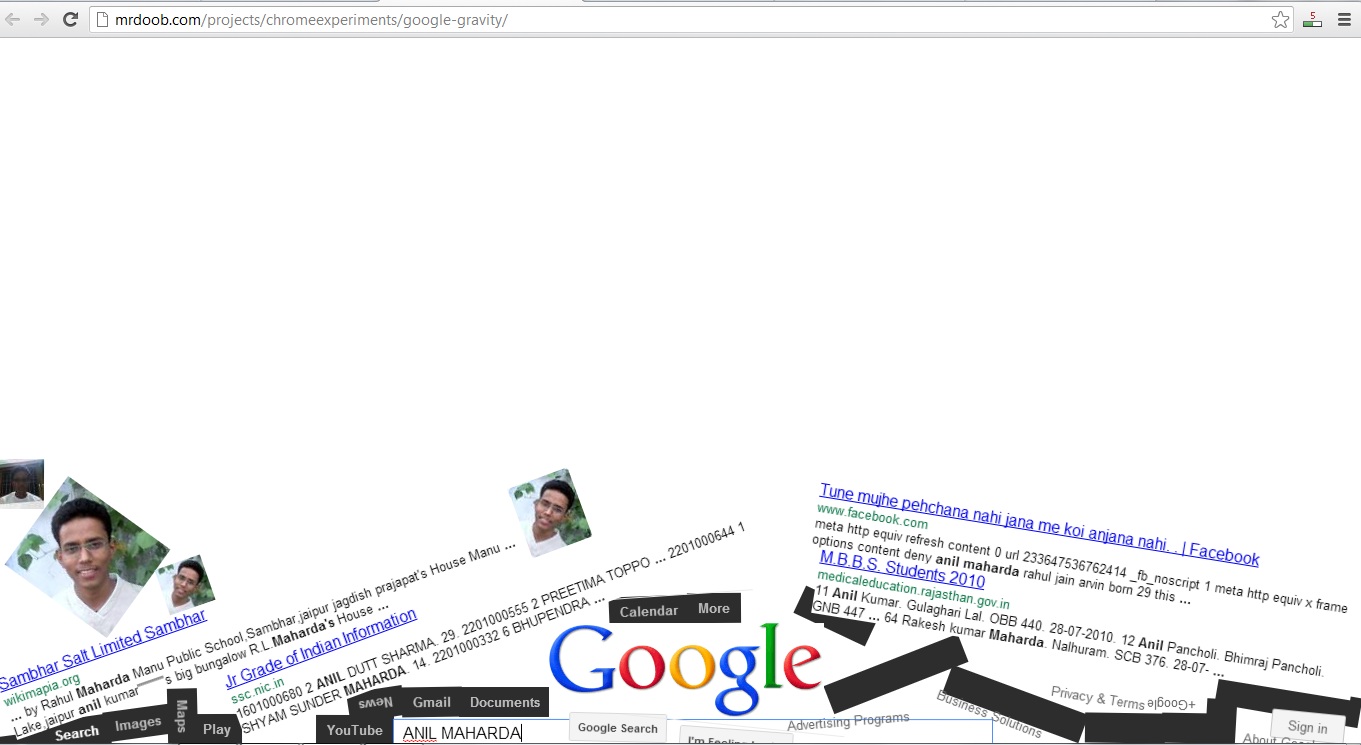
Google Gravity


Awesome gravity of google

Good morning to everyone.I am going to show a funny but awesome tricks of Google.

                                                                                                                                                                               
You are thinking about this picture.It is a cool tricks to have fun.

 Follow below steps to get gravity in action-

 1. Open Google and type google gravity or Click this link.
 2. Now after typing click on I'm feeling lucky.
 3. And see the magic.